Scatter environment assets in Blender
Smart Scatter Kit · Smart Environment Scattering
Add one modifier, point it at a collection and spread forest clutter, construction debris or street litter across any mesh, either by surface angle or around an Empty you can move.
What is Smart Scatter Kit?
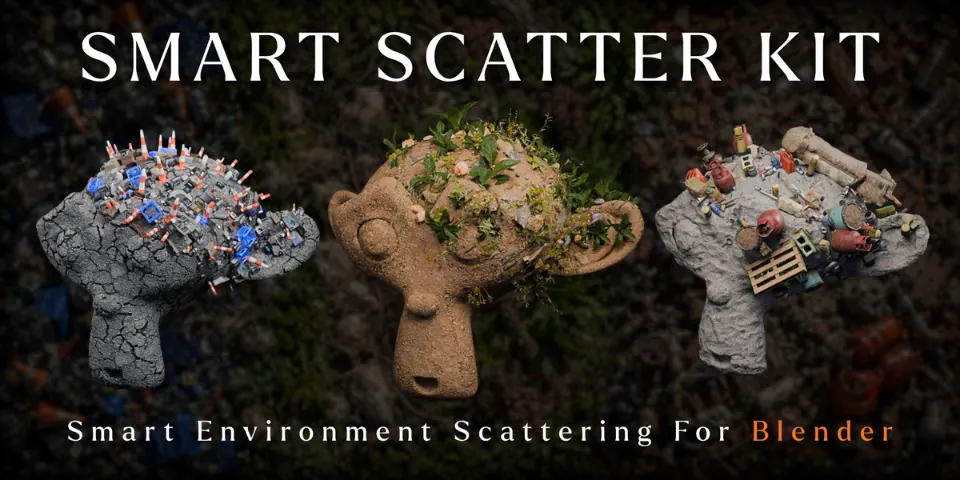
Set dressing is what makes a scene feel lived in, and it is also where hours go on placing rocks, branches and rubbish one at a time. Smart Scatter Kit is a Geometry Nodes modifier that handles the spread. Give it a target mesh and an asset collection, and it distributes the collection across the surface, with a random seed and scale variation you control.
Two modes decide where things land. Surface Normal Distribution reads the direction and angle of the surface, so assets can stay on upward-facing ground or move onto vertical and angled faces. Proximity Falloff uses an Empty as a controller: move it and the cluster follows, with an adjustable falloff around it. Three collections come with the kit, and any collection of your own works as well.
What you can make with Smart Scatter Kit
Forest floors and overgrown ground
Plants, flowers, branches, rocks and weeds from the Forest Floor Clutter collection.
Construction sites and industrial ruins
Brick ruins, pipes, valves, pallets, containers and tools from the Industrial Construction Debris collection.
Abandoned and polluted streets
Garbage, packaging and damaged objects from the Urban Trash & Litter collection, for urban or post-apocalyptic scenes.
Your own asset library
Assign any Blender collection of rocks, foliage or props and reuse the same setup from scene to scene.
How it works
Add the modifier
Put the Smart Scatter Kit modifier on the mesh you want to dress and pick an included collection or your own.
Choose a mode
Surface Normal places assets by the angle of the surface; Proximity Falloff gathers them around an Empty.
Vary and direct
Change the random seed and scale variation, then move the Empty to shift the cluster where you want it.
Tips for better results
- Move the Empty to art-direct clusters, such as rubble gathered at the foot of a wall, without editing the target mesh.
- Try a few seeds before changing anything else; each value gives a new arrangement.
- Results depend on the scale and topology of the target mesh, so check the spread on your final model rather than a stand-in.
- In dense scenes, use optimised assets and lighter viewport settings. The number and complexity of scattered objects set the performance.
- Blender
- 4.0–5.2
- Type
- Geometry Nodes
- Category
- Scatter & Assets
- Sold on
- Superhive
Smart Scatter Kit questions
Do I have to use the included assets?
No. Three collections are included, but you can assign any Blender collection of your own.
Which Blender versions are supported?
Blender 4.0 to 5.2.
What do I need to know to use it?
You should be comfortable adding a modifier and organising objects in collections. Everything else is set on the modifier.
Can I change the scatter later?
Yes. The setup is non-destructive, so the collection, mode, seed and scale stay editable and reusable across scenes.
Smart Scatter Kit on Superhive
Scatter environment assets driven by surface normals or proximity zones to build forest, industrial and urban scenes fast.