Scatter trash and debris in Blender
Trash Scatter · Procedural Scatter System
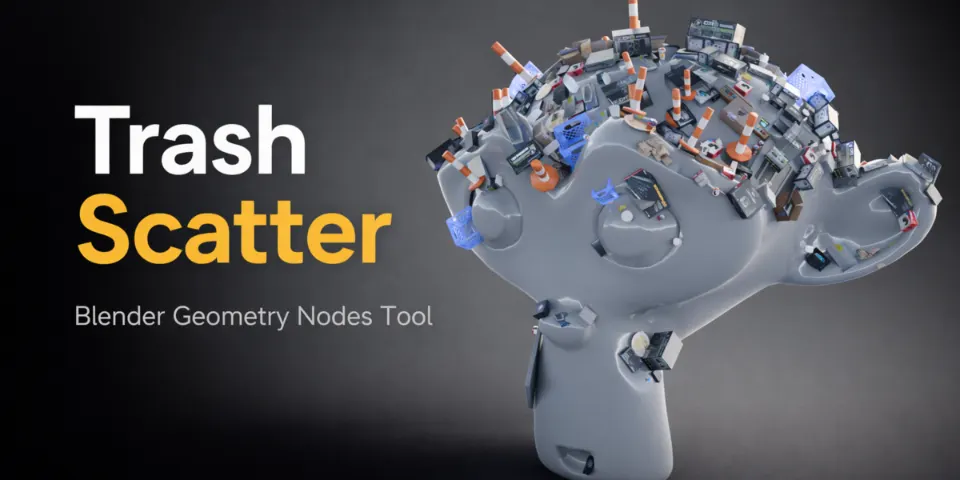
Add one modifier, point it at a collection of trash assets and the surface fills with litter. Density, layout and size stay adjustable the whole time.
What is Trash Scatter?
Streets, alleys and abandoned corners look unfinished without a bit of mess, but placing litter piece by piece is slow and usually ends up looking arranged. Trash Scatter takes over that layer of detail. It is a Geometry Nodes setup that spreads the objects of a collection across any mesh, so a sidewalk, a rooftop or an empty lot gets a natural-looking spread of debris almost straight away.
More than 30 optimized trash assets come with it in a ready-made collection, but the scatter accepts any collection you give it, so the same setup can spread your own props too. It is a plain node setup rather than an add-on, so it does not depend on anything else being installed, and it renders in both Cycles and EEVEE.
What you can make with Trash Scatter
Lived-in city streets
Add litter along curbs, in back alleys and around bins so an urban scene stops looking freshly cleaned.
Background detailing
Fill the parts of the frame the camera only passes over with believable clutter instead of modelling every piece.
Abandoned and post-apocalyptic sets
Go from a light sprinkle of rubbish to heavy coverage on dumps, wastelands and derelict buildings.
Your own debris
Swap in a collection of your own models and reuse the same scatter for any kind of surface clutter.
How it works
Add the modifier
Select a mesh, add a Geometry Nodes modifier and choose Trash Scatter as its node group.
Assign a collection
Pick the included trash collection or one of your own, and the surface is populated right away.
Tune the spread
Set the density with Scatter Amount, try new layouts with Random Seed and vary the size with Scale Variation.
Tips for better results
- Start with a low Scatter Amount and raise it slowly; a light scatter often looks more convincing than full coverage.
- A small amount of Scale Variation is enough to stop the assets from looking copied and pasted.
- When the same surface appears twice in a shot, give each copy a different Random Seed so the litter does not repeat.
- If the road and the sidewalk are separate meshes, give each its own modifier so every area gets its own density.
- Blender
- 3.6–5.1
- Type
- Geometry Nodes
- Category
- Scatter & Assets
- Sold on
- Superhive
Trash Scatter questions
Do I need to install an add-on?
No. Trash Scatter is a Geometry Nodes setup and works inside Blender without any add-ons.
Can I scatter my own assets?
Yes. The scatter works with any collection you assign, so you can replace the included trash with your own models.
What is included?
More than 30 optimized trash assets in a ready-to-use collection, together with the procedural scatter system.
Which Blender versions are supported?
Blender 3.6 to 5.1. It works with both Cycles and EEVEE.
Trash Scatter on Superhive
Drop in any collection and scatter realistic debris with full control. Includes 30+ ready-to-use assets.