Render notifications and a viewport pet for Blender
BlendBuddy · Your Pixel Companion for Blender
BlendBuddy puts a small pixel character in your viewport that tells you, on your desktop or phone, when a long render is done.
What is BlendBuddy?
Long renders tend to finish while you are away from the screen, and small scene mistakes, like a missing camera, unapplied scale, pink textures or a black render, take time to track down. BlendBuddy helps with both. Click your pet and Scene Doctor checks your scene and fixes many issues in one click; Ask me… finds quick answers to everyday Blender questions.
Render alerts arrive as a desktop notification with a sound, as a Discord message on your phone with a picture, the file name and the render time, or on Windows as your pet popping up above the taskbar. Between renders it walks and hops around the viewport, plays with up to three friends and does a random trick when you click it.
 WATCH THE VIDEO
What you can make with BlendBuddy
Long renders and bakes
Set a minimum render time so only long jobs send an alert, decide whether bakes count, and check the result on your phone.
Working in other apps
On Windows, send the pet onto your desktop. If Blender is in the background when a render finishes, it pops up above the taskbar.
Company for long sessions
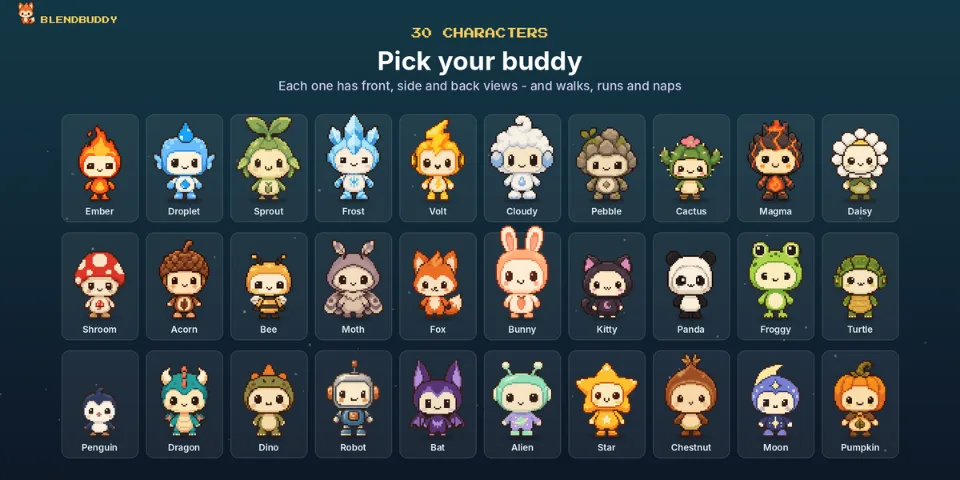
Pick one of 30 characters, recolor it, add a hat or headphones, give it a name and bring up to three buddies along.
How it works
Adopt a buddy
Install the extension, open the BlendBuddy tab in the sidebar and choose a character, its color, size, accessory and name.
Set up alerts
Use desktop notifications, or paste a Discord webhook link under Phone Notifications and press Send Test Message for alerts on your phone.
Click when stuck
Click the pet to let Scene Doctor check your scene, or use Ask me… to look up a quick answer.
Tips for better results
- Choose Stay Put, or keep the pet on the bottom edge, if you prefer a calm viewport.
- Footsteps and the 8-bit song are off by default, and every sound can be turned down or off.
- Phone alerts need a free Discord account and Allow Online Access, found under Preferences > System > Network.
- Discord may delay phone alerts while you are active in Discord on your PC; the built-in guide explains how to change this.
- Blender
- 4.2–5.2
- Type
- Add-on
- Category
- Tools & Helpers
- Sold on
- Superhive
BlendBuddy questions
Which Blender versions are supported?
Blender 4.2 or newer, installed as a Blender extension. The desktop pet needs Windows; everything else works on Windows, macOS and Linux.
Where is my Discord webhook link stored?
Only in Blender's preferences on your computer. It is used to post to your own Discord channel and is not sent anywhere else.
What happens if Discord or my internet is down?
Your render is not affected. BlendBuddy does not block Blender, and the panel tells you what went wrong.
What is the Halloween Edition?
An edition with 10 extra spooky characters, 40 in total, installed from its own zip file.
BlendBuddy on Superhive
Adopt one of 30 pixel characters who fixes common scene issues, shares tips and sends render alerts to your desktop or phone.