Procedural ice and frost in Blender
Freezing Effect · Procedural Ice & Frost Modifier
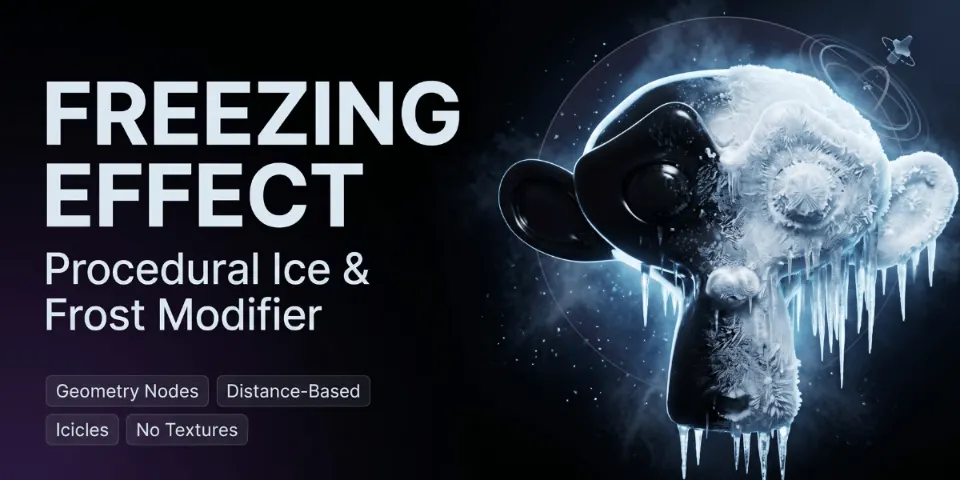
Bring a controller object close to a mesh and ice spreads over its surface, with frost, crystals and hanging icicles, all from a single modifier.
What is Freezing Effect?
Frozen objects turn up everywhere from fantasy spells to winter scenes, and they are usually slow to make: sculpted ice, painted masks and a separate setup for icicles. Freezing Effect handles the whole look with one Geometry Nodes modifier. A separate controller object sets where the ice begins; parts of the mesh near it freeze first, while parts further away stay lightly frozen or untouched, depending on your settings.
Because the freeze follows the controller, animating it only takes moving or keyframing that object. Ice thickness, breakup, surface crystals and icicles are all set on the modifier panel, the original mesh stays intact underneath, and no image textures are involved. It renders in Cycles and EEVEE.
What you can make with Freezing Effect
Ice magic and powers
Frost creeps out from the point a character touches, ready for fantasy shots and spell effects.
Frozen props
Coat bottles, weapons, rocks or machinery in ice and icicles for winter sets and close-ups.
Winter environments
Add frost and hanging icicles to railings, signs and ledges to make a scene feel cold.
Cinematic reveals
Let ice travel across an object over time for stylized transformations and slow reveals.
How it works
Add the modifier
Put Freezing Effect on any mesh. A separate controller object decides where the freezing starts.
Place the controller
Move it toward the area that should freeze first; the ice spreads outward from there.
Shape and animate
Set Freeze Amount, Ice Thickness and Ice Breakup, switch crystals and icicles on or off, and keyframe the controller.
Tips for better results
- Keep Ice Quality low while you block out a shot and raise it for the final render.
- To make ice travel across an object, animate the controller's position instead of editing the mesh.
- Turn icicles off for surfaces that should look frosted rather than dripping, and use Icicle Density and Icicle Length to fit them to the size of the prop.
- Open the included demo scene first to see a working controller setup before using it on your own models.
- Blender
- 4.3–5.1
- Type
- Geometry Nodes
- Category
- Geometry Nodes
- Sold on
- Superhive
Freezing Effect questions
Does it change my original mesh?
No. The effect is non-destructive; the mesh underneath the modifier is left exactly as it was.
Can I animate the freezing?
Yes. Move or keyframe the controller object and the frozen area follows it, so the ice spreads over time.
Do I need textures, baking or sculpting?
No. The ice, frost, crystals and icicles are generated procedurally with Geometry Nodes and Shader Nodes.
Which Blender versions are supported?
Blender 4.3 to 5.1. Blender 5.0 or newer is recommended, and it has been tested up to 5.1.
Which render engines does it work with?
Cycles and EEVEE.
Freezing Effect on Superhive
A distance-based modifier that grows ice, frost, crystals and icicles on any mesh.