Seamless procedural terrain materials for Blender
Procedural Terrain Materials Pack · 14 Seamless Materials
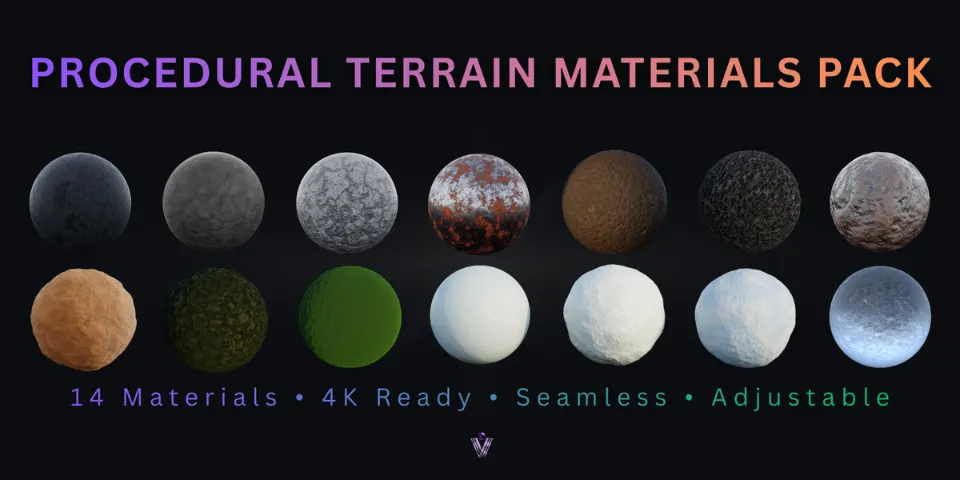
Fourteen ground and hard-surface shaders, from powder snow to asphalt, each with its own small control panel so you can change the look without opening the node tree.
What is Procedural Terrain Materials Pack?
The ground covers a large part of most environment shots, and image textures bring the usual trouble with them: visible seams, maps to download and relink, and detail that runs out when the camera gets close. This pack swaps them for 14 fully procedural materials that tile without seams and can be scaled up for close-ups.
The materials come in four groups. Hard surfaces cover asphalt, cast concrete, stone and rusted metal with flaking paint; the soils are mud, rich garden soil and an organic soil surface; sand and moss bring compact sand, velvet moss and patchy moss ground; and snow and ice include powder snow, packed snow, an icy snow blend and frosted ice. Each material sits inside a node group with its own UI control panel, and the pack is optimized for Cycles.
What you can make with Procedural Terrain Materials Pack
Winter and alpine scenes
Four snow and ice materials take you from soft powder and packed trails to icy, frosted ground.
Forest floors and gardens
Mud, garden soil, organic soil and two moss materials for the ground beneath trees and plants.
Streets, ruins and props
Asphalt, cast concrete, stone and rusted metal with flaking paint for urban sets and scene dressing.
Fast terrain look-dev
Try several ground types on a landscape one after another, then refine the one that fits the shot.
How it works
Open the library
Open the included .blend file and browse the materials in the Asset Browser or the material previews.
Apply a material
Assign it to a terrain, a ground plane or a prop like any other Blender material.
Adjust the panel
Change scale, roughness, breakup, bumps, coverage and more in the material's control panel.
Tips for better results
- Compare looks in the material previews before you assign anything to a large terrain.
- Set the scale first so the size of the detail matches your scene, then work on roughness and bumps.
- Add the folder with the .blend file to your asset libraries in Preferences so the materials are one drag away in every project.
- Make everyday changes in the control panel and open the node tree only when you want to go beyond its settings.
- Blender
- 4.0–5.0
- Type
- Material Pack
- Category
- Terrain
- Sold on
- Superhive
Procedural Terrain Materials Pack questions
Do I need any image textures?
No. All 14 materials are fully procedural, so there are no texture files to download, pack or relink.
Do the materials tile?
Yes. Every material is seamless and tileable, and the detail can be scaled up for close-up shots.
Which render engine are they made for?
Cycles. The materials are built and optimized for rendering in Cycles.
Can I use them on props as well as terrain?
Yes. They suit environments, terrains, props and general scene dressing.
Which Blender versions are supported?
Blender 4.0 to 5.0. See the product page for the latest compatibility.
Procedural Terrain Materials Pack on Superhive
14 seamless procedural materials (snow, ice, soil, sand, moss, asphalt, concrete and more), Asset Browser ready.